AI builder for LEGO® bricks: real steps, not just pictures
 ⬅️🔊📤
 ⬅️🔊📤
 ⬅️🔊📤
 ⬅️🔊📤⬅️🔊📤
Many “AI LEGO® generators” make a picture or a 3D shape that looks like bricks, with no steps to follow. Some place real bricks and check the model holds, among them BrickGPT, a research model from Carnegie Mellon University, and Tumbly Blocks, which designs what your kid asks for from the bricks on your table, ages 2 to 13.
Brick apps and tools
How they compare
From each tool’s own pages and paper on November 9, 2026. Tools and prices change, so check before you pay.
| Feature | Tumbly Blocks | BrickGPT | AI image and 3D generators | Brickit |
|---|---|---|---|---|
| You start with | What your kid asks for, and a photo of your bricks | A text prompt | A text prompt or a photo | A scan of your pile, spread out |
| You get | A new design for what your kid asks for | A brick model inside a 20×20×20 grid | A picture, or a 3D shape in a brick style | Ideas from its catalog your pile can make |
| Real bricks that fit together | ✓ | ✓ | — | ✓ |
| Steps to follow | Every step in 3D, checked by the camera | Its bricks in order, from the bottom up | — | Building instructions |
| Uses only the bricks you have | ✓ | — | — | ✓ |
| Sized for ages 2–13 | ✓ | — | — | — |
| Price | Free to start, Family $7.99/mo | Free, open source | Varies (StarryAI’s is free to start) | Free, Pro from $6.99/mo |
| Where | iPhone, iPad, Android, web browser | Code on GitHub, a web demo | Web browser, some phone apps | iPhone, iPad, Android |
A picture, a 3D shape or a build
Three different things come up when you search for an AI that builds with bricks.
- Pictures. Many tools called an “AI LEGO® generator” are image generators. StarryAI’s, for one, “generates unique Lego-inspired images from your prompts.” You get something to look at, with no parts list and no steps.
- 3D shapes. Some make a 3D model in a brick style. 3D AI Studio’s guide says its models are “continuous 3D meshes, not individual interlocking bricks”: you can print one to put on a shelf, but it “won’t snap together with actual LEGO studs.”
- Builds. A few place real bricks and check that the model holds together, like BrickGPT and Tumbly Blocks. You can build these.
BrickGPT, the research model (first called LegoGPT)
Researchers at Carnegie Mellon University published it in May 2025 as LegoGPT, and their paper now calls it BrickGPT. You type what you want, and it adds one brick at a time, from the bottom up. When a finished model is unstable, it goes back to just before the first unstable brick and carries on from there. In the paper’s tests, 98.8% of its models were stable, and both people and robot arms built them.
Its limits are the ones the researchers list: a 20×20×20 grid, eight standard brick sizes from 1×1 to 2×6, and the 21 kinds of object it learned from more than 28,000 3D models. Its model, dataset and most of its code are free under the MIT license, on GitHub and Hugging Face. It starts from words alone, so it doesn’t know which bricks you own or how old the builder is.
How Tumbly Blocks designs a build
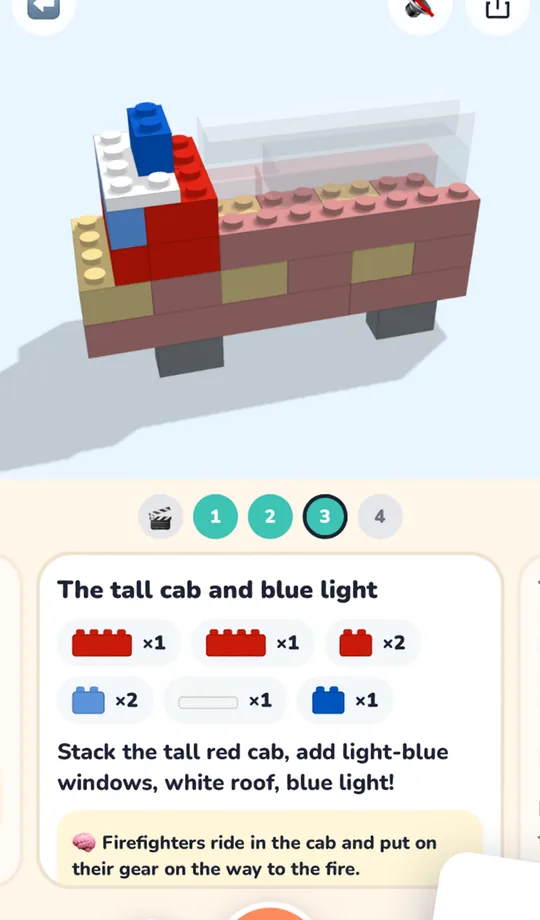
- Your kid says what. A jet, a castle, a fire truck: whatever they want today.
- The camera reads your bricks. Point it at the bricks on the table. LEGO® bricks, DUPLO® big bricks and plain wooden blocks all work.
- It designs from only those. It sketches the idea, places real bricks, then checks the model: no two bricks in the same spot, every brick connected and supported, and no more of a brick than you have. It fixes what doesn’t pass.
- Your kid builds it, step by step. Every step turns in 3D, a voice reads it, and the camera checks it. The design is sized for their age, from 2 to 13.
The trade-off: a new design takes a few minutes, because it’s designed and checked for your bricks rather than drawn as a picture. A finished build comes with a picture book, an animation, a 3D print file and an LDraw file.
When another tool is the better pick
- You want a picture. For a poster or a party invitation, an image generator is quicker, and the picture never has to stand up.
- You like to tinker with the research. BrickGPT’s code, model and dataset are free, and you can run it yourself.
- You have a big mixed bin and no plan. Brickit scans a spread-out pile and suggests ideas from its catalog. Here’s how Tumbly Blocks and Brickit differ.
- You bought a set. LEGO® Builder is the official free app with the instructions for LEGO® sets. Here’s how the LEGO® Builder app works.
- You’ve already built it and want a booklet. BrickLink Studio makes one from a model you rebuild on screen. Here’s how to get custom instructions for LEGO® bricks.
We make Tumbly Blocks, so read the other tools’ own pages before you decide.
Try it on your own pile.
Show Tumbly Blocks the bricks on your table and say what your kid wants. It designs a build from only those bricks, checks it holds, and shows every step in 3D.


Scan with your iPhone cameraor open it in your browser
Questions parents ask
Is there an AI that makes LEGO® building instructions?
Yes. Tumbly Blocks designs a build from what your kid asks for and the bricks on your table, then shows every step in 3D. BrickGPT, a research model from Carnegie Mellon University, turns a text prompt into a stable brick model and lists its bricks in order, from the bottom up. An image generator makes only a picture.
What is LegoGPT?
LegoGPT was the first name of BrickGPT, a model from researchers at Carnegie Mellon University, published in May 2025. It turns a text prompt into a brick model inside a 20×20×20 grid, from eight standard brick sizes, and checks that the finished model is stable, going back to fix it if it isn’t. Its code is free on GitHub, mostly under the MIT license.
Is there a free AI builder for LEGO® bricks?
Yes. Tumbly Blocks is free to start on iPhone, iPad, Android and in any web browser at tumbly.ai/play/blocks. Here’s what the free and paid plans include. BrickGPT is free too: its code is on GitHub, and its project page links to a demo.
Can an AI image generator make LEGO® instructions?
Not real ones. An image generator makes a picture, with no parts list or steps. Some tools make a 3D model in a brick style instead, and 3D AI Studio says of its own that they’re “continuous 3D meshes, not individual interlocking bricks,” so a print “won’t snap together with actual LEGO studs.”
Can AI design a build from the bricks we already have?
Tumbly Blocks does. The camera reads which bricks and colors are on your table, and each design uses only those, never more of a brick than you have. BrickGPT starts from words alone, and image tools from a prompt or a photo. Brickit scans your pile too, but it suggests ideas from its catalog rather than designing what your kid asks for.
What age is Tumbly Blocks for?
Ages 2 to 13. It sizes each design to the kid: a toddler gets a few big pieces and a tween gets a longer build. Here’s which bricks fit each age.
What happens to the photo of my bricks?
The camera and new designs turn on only after a grown-up signs in and agrees. A photo for a new design is held until the design is made, at most a day, and then deleted.
Is Tumbly connected to the LEGO Group or to BrickGPT?
No. Tumbly has no connection to the LEGO Group, to BrickGPT’s researchers or to any other tool on this page.