How to get custom instructions for LEGO® bricks
Tumbly Blocks has designed 121 new models on request, and we’d still check for an existing design first, because a model a fan chose brick by brick usually looks better. Rebrickable is the place to search. If you’ve already built your own model and want a booklet, BrickLink Studio makes one for free on a computer. If nobody has designed what your kid wants, Tumbly Blocks designs it from the bricks on your table, with every step shown.
That count runs to November 10, 2026, and includes our own tries. One of the 121 never finished. Of the other 120, 117 passed every check we run, and the typical one had 22 pieces and 4 steps. Those checks can’t tell you whether a model looks right, though, which is why we’d send you to a fan’s design first.
Brick apps and tools
Which way fits your build?
The other columns come from those tools’ own pages and help guides, read on November 10, 2026. A dash means it doesn’t do that, or its pages don’t say it does. Prices and features change, so check before you pay.
| Feature | Tumbly Blocks | Rebrickable | BrickLink Studio |
|---|---|---|---|
| Best when | Nobody has designed your kid’s idea | A fan has already designed it | You’ve built a model and want a booklet |
| You start with | What your kid asks for and a photo of your bricks | A search, plus your own parts if you add them | A model you build on screen or open from a file |
| You get | A new design with every step in 3D | A fan’s instructions for their model | A print-ready PDF or PNG pages |
| Uses only the bricks you have | ✓ | Its Build search shows what you can make and what’s missing | If you set up a palette of your parts |
| Sized for your kid’s age | Ages 2–13 | — | — |
| Price | Free to start, Family $7.99/mo | Free designs, and paid ones priced by each designer | Free |
| Where | iPhone, iPad, Android, web browser | Web browser | Windows or Mac |
| Made by | Winding AI, Inc. | Fans who post on Rebrickable | BrickLink, owned by the LEGO Group |
If you bought a boxed set and lost the booklet, you don’t need any of these. The LEGO Group has free PDFs for thousands of its sets on its instructions page, and the LEGO® Builder app has the steps too. For a set older than about 1999, or one with no number to go on, here’s where we found lost LEGO® instructions for 13 sets.
One of these is ours, so you may want the others in their own words. Here are Rebrickable’s guide to finding designs and BrickLink Studio’s help center.
What if a fan has already designed it?
Fans call a model they designed themselves a MOC, short for My Own Creation, and Rebrickable is the biggest collection of them we know of. Some designers give their instructions away and others sell them at a price they set, and you can search for either.
The feature we’d try first is its Build search. Add your sets and loose parts, and it shows which designs your collection can make and lists what you’re missing. Rebrickable doesn’t sell parts itself, so it links you to other stores for the ones you’re missing.
A person chose every brick in these, and it shows. They’re also made by people who love this hobby for other people who love it, so read the parts list before you promise anyone a dragon. For a shorter list, Belle-Ve Bricks, a shop that makes custom kits, posts free designs, most of them with PDFs.
What if you’ve already built it?
Then you need a program that makes booklets, and we’d start with BrickLink Studio. It’s free, it runs on Windows and Mac, and the LEGO Group recommends it to anyone who wants to design and build digitally. The catch is that you have to build your model again on screen before it can make anything. (LEGO® Digital Designer, the older free program, is retired: here’s what happened to LEGO® Digital Designer.)
Its Instruction Maker has two halves. In the Step Editor you sort your bricks into steps, and a feature called Divide into steps can do it for you, though Studio’s own help says that works best on simple builds. Page Design lays the steps out for print, with a full parts list if you want one, and exports a PDF or a set of PNG pictures. It can also test whether your design could be built with real bricks.
If you’d rather work with open files, LPub3D is free and open source, runs on Windows, macOS and Linux, and makes booklets from models in LDraw, a free, community-run system for modeling bricks on a computer. It has more to learn, so we’d only go there if Studio can’t do what you need.
And if that all sounds like a lot for one model, take a photo after every few bricks and keep them in an album. A kid can follow that tomorrow.
What if nobody has designed it yet?
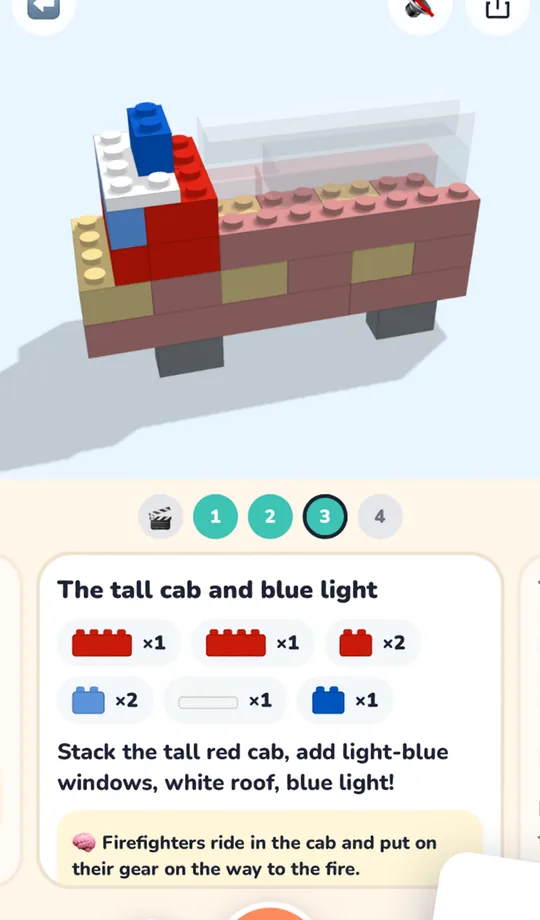
That’s the case we made Tumbly Blocks for. Your kid says what they want, the camera reads the bricks on your table, and it designs a model from only those. A 2- or 3-year-old gets two or three steps and up to 10 big bricks, and a 10- to 13-year-old gets six to nine steps and up to 160 bricks. In the app every step turns in 3D, a voice reads it, and the camera checks it. Here’s which bricks fit each age.
A new design comes in steps like these. This is the dump truck from our free builds, with 10 pieces and 3 steps, and the new bricks are outlined each time.


It can’t work backwards, so it won’t turn a model your kid has already built into instructions. For that you’d want Studio. Going the other way is easy, because a finished design can be saved as an LDraw file, which Studio opens.
How have our designs turned out so far?
A design passes only when no two bricks share a spot, every brick is connected and supported, and it uses no more of a brick than it was given. Those are software checks on the design, and we haven’t built all 120 by hand.
| How it was made | Designs | Passed every check | Typical size | Typical wait |
|---|---|---|---|---|
| In the app, with the full designer | 35 | 32 | 24 pieces, 4 steps | About 2 minutes |
| On our gift pages, in one fast pass | 37 | 37 | 22 pieces, 3 steps | About 7 seconds |
| On our gift pages, with the full designer | 49 | 48 | 21 pieces, 4 steps | About 2 minutes |
Passing doesn’t mean it looks like the thing. In our October lab tests, AI judges scored designs from 1 to 10 on whether a kid would name the model without being told, and we told them to be strict. Our AI designs came in around 4. Builds that a person had picked and fixed scored 5.5 to 7. So expect a model that’s simple and blocky, not a display piece.
We’ve got this wrong before, too. In a batch of 87 designs, one round of fixes rescued 25 first drafts that couldn’t have been built, and it also broke 3 that were fine. We changed the rule, so a design that passes now stays passing.
Ask for the build nobody has made.
Your kid says what they want, and you get a build made from only the bricks on your table, sized for their age, with every step in 3D.


Scan with your iPhone cameraor open it in your browser
Questions parents ask
Can I make my own LEGO® instructions?
Yes, on a computer. BrickLink Studio is free for Windows and Mac. Build your model on screen, sort it into steps or let the program divide it for you, then export a PDF or PNG pictures of each page.
Can I make LEGO® instructions on a phone or iPad?
Not with Studio, which is a desktop app for Windows and Mac. On a phone or tablet, our app designs a new build and shows every step, but it can’t turn a model you already built into instructions. For that, a photo after every few bricks works fine.
Where can I find free custom LEGO® instructions?
Rebrickable has many free fan designs, and its search can leave out the paid ones. Belle-Ve Bricks keeps a list of free designs, most with PDFs. We also post free step-by-step builds made of plain bricks.
What is a MOC?
It stands for My Own Creation, the word fans use for a model that isn’t an official LEGO® set. People say it about anyone’s custom design, not only their own.
Can I get a custom build designed for my kid?
Yes. Tumbly Blocks takes what your kid asks for and a photo of your bricks, then designs it for their age, from 2 to 13. It’s on iPhone, iPad, Android and in a web browser.
How do I buy the pieces for a custom design?
Rebrickable’s Build search shows what you’re missing, and you order those pieces from another store. Studio can check whether the parts in your design are available on BrickLink and what they cost. Our app designs from the bricks you already own, so there’s nothing to buy.
Can I open a Tumbly Blocks design in BrickLink Studio?
Yes. A finished design can be saved as an LDraw file, which Studio opens. From there you can change the model or lay out a booklet to print.
What happens to the photo of my bricks?
We hold a photo for a new design until the design is made, at most a day, and then delete it. The camera and new designs turn on only after you sign in and agree.
Is Tumbly connected to the LEGO Group, BrickLink or Rebrickable?
No. Tumbly is made by Winding AI, Inc., which has no connection to any of them.