Which scanner app for LEGO® bricks does what?
Each scanner app for LEGO® bricks does a different job. BrickScan and Minifig Scan identify minifigures. Brickit, Pileometer and Brick Scanner scan a spread-out pile and show catalog builds it can make. LEGO® Builder opens a set’s steps from the booklet’s QR code. Tumbly Blocks, which we make, designs the thing your kid asks for from the pile.
So the best one depends on the job. With a bin of mixed bricks, it comes down to one question. Does your kid want to browse ideas, or have they already decided what to build? We compared the apps on November 14, 2026, using their US App Store and Google Play pages.
Brick apps and tools
What does each scanner app do?
Start with the second column. An app that’s great at naming a minifigure won’t help a six-year-old build a truck.
Costs, age ratings and stars come from each app’s US App Store page on November 14, 2026. Apple shows up to ten in-app purchases, so a range is what it listed, not every price. Check the listing before you pay.
| App | What you point it at | What you get | Cost on the US App Store | App Store age rating | App Store stars |
|---|---|---|---|---|---|
| Tumbly Blocks (in Tumbly: Kids Engineering Games) | Your spread-out bricks, after your kid says what they want | A new design of that thing from only those bricks, sized for ages 2 to 13, with every step in 3D | See plans | 4+ | No ratings yet |
| Brickit | Your spread-out bricks | Ideas from its catalog that the pile can make, and where each part is in the photo | Free to download, in-app purchases listed from $6.99 to $64.99 (November 18, 2026) | 13+ | 4.5 from about 23,000 |
| Pileometer by Brickit | Your parts, a batch at a time | A catalog of the parts you own, where each one is stored, and building ideas for them | Free to download, in-app purchases listed from $6.99 to $99.99 | 4+ | 4.3 from about 380 |
| Brick Scanner - Detect & Build | Your bricks | The name of each piece, and sets you can make with them | Free to download, in-app purchases listed from $2.99 to $19.99 | 4+ | 4.3 from about 810 |
| Brick My World | A real object, like a mug or a toy | A brick model of it, with PDF steps and a parts list you then collect | Free to download, each model’s files listed from $3.99 to $16.99 | 4+ | 2.3 from 12 |
| Minifig Scan | The code on a sealed Minifigures box | Which figure is inside, so you skip duplicates | Free, with optional tips from $1.99 to $9.99 | 4+ | 4.9 from about 3,000 |
| BrickScan | A minifigure or a part | What it is, and what it’s worth | Free to download, Premium listed from $3.99 to $54.99 | 4+ | 4.9 from about 1,600 |
| LEGO® Builder | The QR code in a set’s booklet | That set’s official 3D steps | Free | 4+ | 4.8 from about 292,000 |
Which app builds something from a mixed pile?
Four apps start from the bricks you already have. Three show you what the pile can make. One makes what your kid asks for.
| Feature | Tumbly Blocks | Brickit | Pileometer | Brick Scanner |
|---|---|---|---|---|
| Starts from | What your kid wants, then the pile | The pile | The pile | The pile |
| Builds come from | A new design for your bricks | Its catalog | Its catalog | Its catalog of sets |
| Helps you find a part | — | Highlights it in the photo | Tracks where it’s stored | — |
| Keeps a list of what you own | The bricks you scanned | ✓ | ✓ | — |
| Sized for your kid’s age | Ages 2–13 | — | — | — |
| Reads each step aloud | ✓ | — | — | — |
| Checks each step with the camera | ✓ | — | — | — |
| Where | iPhone, iPad, Android, web browser | iPhone, iPad, Android | iPhone, iPad, Android | iPhone, Android |
A dash means the app doesn’t do it, or its listing doesn’t say it does. The Android apps are on Google Play.
When is another app the better pick?
- Your kid wants to browse. Brickit suggests thousands of ideas the pile can make, and picking one is half the fun. It has been on the App Store since 2019 and has about 23,000 ratings there.
- You need one part from a big bin. Brickit highlights where a part is in your photo. Pileometer keeps track of where each part is stored. Tumbly Blocks does neither.
- You want to sort a big collection. Pileometer is made for that. It’s an app and a storage system, with a catalog of every part you own.
- You collect minifigures. BrickScan names them and estimates their value, and Minifig Scan tells you what’s in a sealed box.
- You want a brick copy of a real thing. Brick My World turns a scan of an object into a model, and then you gather the bricks it lists.
- You have the set and its box. LEGO® Builder has the official steps for sets from 2000 on, and you can turn each one in 3D.
What does Tumbly Blocks do that the others don’t?
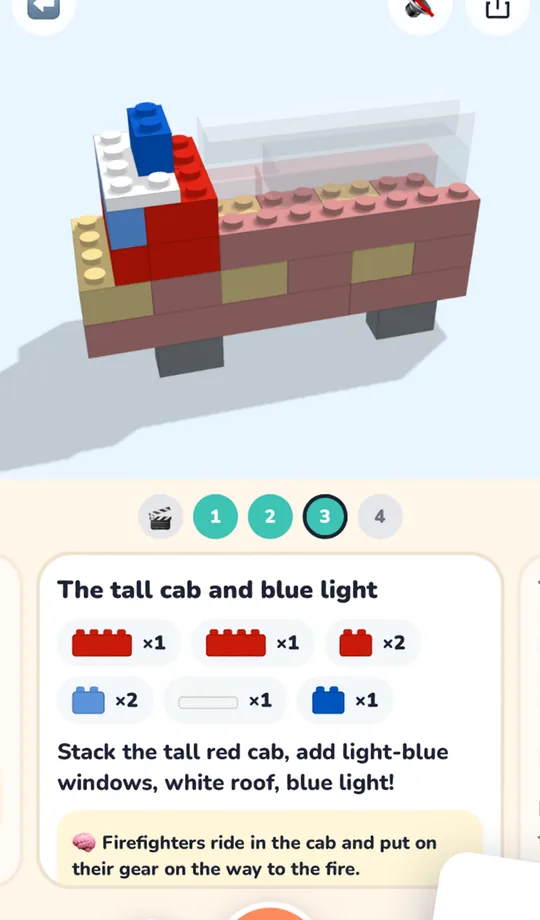
It designs a new build for the idea your kid already has. Your kid says “a fire truck,” you take a photo of the bricks on the table, and in about two minutes there’s a fire truck made of only those bricks. It’s sized for their age, every step turns in 3D, and a voice reads each one.
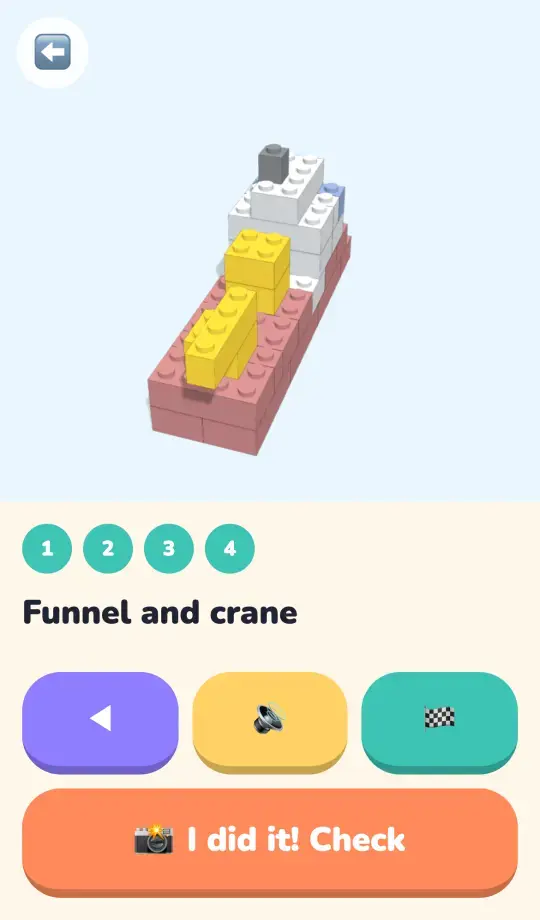
That’s one step of a ship. The speaker button reads it aloud, and the orange button asks the camera to check the bricks.
By November 10, 2026 it had made 121 designs on request, counting our own tries. Our software checks that no two bricks share a spot and that every brick is held up, and most designs pass. They come out simple and blocky. Don’t expect a display piece. Here’s how they’ve turned out so far.
The trade-off is the wait. A catalog idea shows up at once, while a new design takes a couple of minutes. Tumbly Blocks is one of the Kids Engineering Games in Tumbly.
Try it on your own pile.
Take a photo of the bricks on your table and say what your kid wants. Tumbly Blocks designs it from what’s there, sized for their age, with every step in 3D.


Scan with your iPhone cameraor open it in your browser
Questions parents ask
Is there an app that designs builds from the bricks I already have?
Yes, two kinds. Brickit, Pileometer and Brick Scanner - Detect & Build scan your bricks and show builds from their catalogs that your pile can make. Tumbly Blocks starts from what your kid asks for, say a fire truck or a castle, and designs it from only the bricks in the photo.
What is the best scanner app for a kid?
It depends on whether your kid has an idea yet. A kid who wants to browse what the pile can make will like Brickit. If your kid already said “a dragon,” try Tumbly Blocks, which designs one for their age and reads each step aloud. For a boxed set, use LEGO® Builder.
Which app scans minifigures?
BrickScan names a minifigure or a part from a photo and estimates its value. Minifig Scan reads the code on a sealed Minifigures box, so you know which figure is inside before you open it. Tumbly Blocks doesn’t identify minifigures.
Can an app turn a photo of a real object into bricks?
Brick My World does. You scan an object with an iPhone or iPad, and it makes a brick model with PDF steps and a parts list. Then you go and gather the bricks it needs. Brickit and Tumbly Blocks work the other way round, from the bricks you already have.
What age are these apps for?
On the US App Store, on November 14, 2026, Brickit was rated 13+ (its page notes user-generated content and social media) and every other app on this page 4+. Tumbly Blocks sizes each design for ages 2 to 13.
Does the LEGO® Builder app scan loose bricks?
No. You scan the QR code in a set’s instruction booklet, or search by set name or number, to open that set’s steps. Here’s how the LEGO® Builder app works.
What happens to the photo of my bricks in Tumbly Blocks?
We hold a photo for a new design until the design is made, at most a day, and then delete it. The camera and new designs turn on only after a grown-up signs in and agrees.
Is Tumbly connected to any of these apps?
No. Tumbly is made by Winding AI, Inc., which has no connection to Brickit, Brick Scanner, Brick My World, Minifig Scan, BrickScan or the LEGO Group.
Sources
Each app’s US App Store page, read November 14, 2026, and Google Play for the Android column. The “better pick” lines are our own judgment, and we make Tumbly.
- Brickit: Your Brick Collection: apps.apple.com/us/app/id1477221636
- Pileometer by Brickit: apps.apple.com/us/app/id6590601507
- Brick Scanner - Detect & Build: apps.apple.com/us/app/id6751249486
- Brick My World: apps.apple.com/us/app/id6739494216
- Minifig Scan: apps.apple.com/us/app/id6475598662
- BrickScan: AI Minifig Scanner: apps.apple.com/us/app/id1602067461
- LEGO® Builder: 3D Instructions: apps.apple.com/us/app/id1486159728
- Tumbly: Kids Engineering Games: apps.apple.com/us/app/id6820330287
- Brickit on Google Play: play.google.com/store/apps/details?id=com.brickit.brickit
- Pileometer on Google Play: play.google.com/store/apps/details?id=com.brickit.pockets.app
- Brick Scanner - Detect & Build on Google Play: play.google.com/store/apps/details?id=com.bluedust.brickscanner